by Martin Brinkmann on July 31, 2019 in Windows – Last Update: July 31, 2019 – 2 comments
Windows Calculator is a popular application that is included as a native tool in all versions of the Windows operating system. Microsoft released Windows Calculator’s source recently, and the program is now also available on the Web and the mobile operating systems Android and iOS.
Microsoft experimented a bit with Windows Calculator in the past; it released a huge version in the Windows 10 Creators Update feature update but there has not been much change otherwise. Most Windows users seem quite happy with the current state of the Calculator. That is not to say that there are not any alternatives available. There is the scientific calculator RedCrab, or the unit converter Calculatormatik. And if you want something crazy, there is even a mouse with calculator functionality.
Tip: Check out our guide on fixing the You’ll need a new app to open this calculator error when launching Windows Calculator on Windows 10, and our guide on changing the size of Calculator.
One of the missing features of Windows Calculator that is highly requested according to Microsoft is an always on-top mode. That mode locks the Windows Calculator window in place so that it is always visible on the screen. If you move another program window on top of Windows Calculator currently, you won’t be able to interact with it anymore until you activate it again to make it the foreground application.
When attempting to use Calculator with other application, such as a spreadsheet, Calculator will lose focus when you click on the other app (e.g. to scroll/copy). Users have requested the ability to pin Calculator on top of other windows to facilitate ongoing use with other apps.
Dave Grochoki, a Microsoft program manager for Notepad and Windows Calculator, revealed on July 30, 2019 that on-top mode functionality is coming to Windows Calculator.
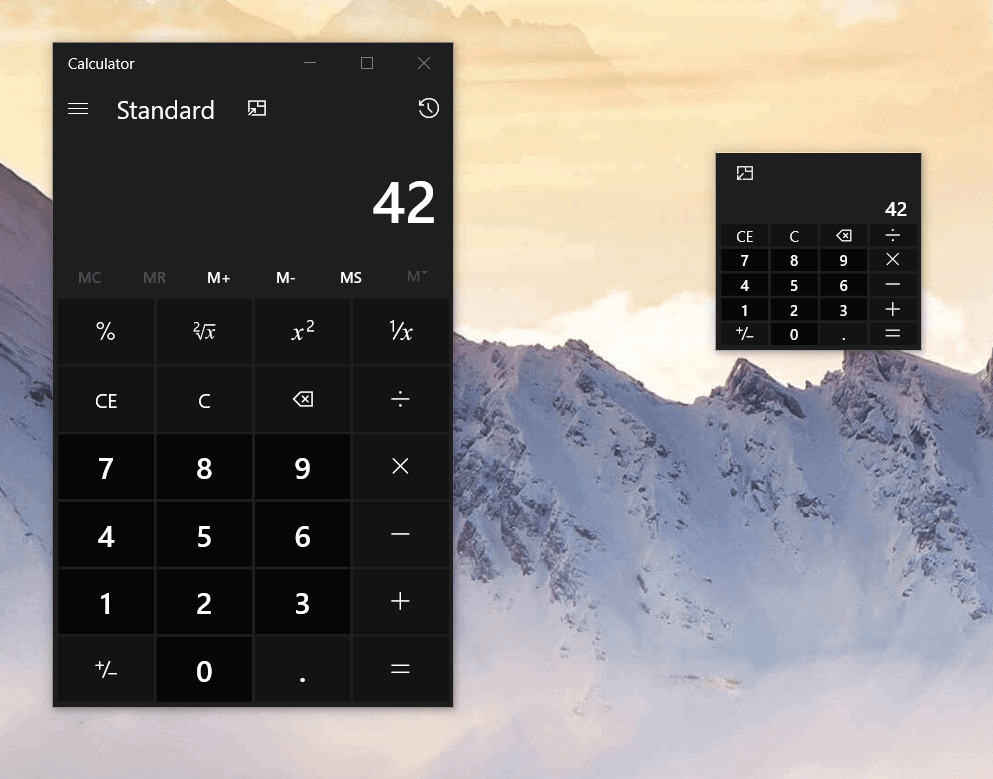
Grochoki did not reveal an exact date for the release of the new Windows Calculator version; it appears that Microsoft plans to push the update via the Microsoft Store to all Windows 10 devices that support it.
A click on the new on-top icon makes Windows Calculator sit on top of all other program windows; ideal for making calculations using it while working in other program windows.
The new version of Windows Calculator comes with another requested feature: tiny calculator. Tiny Calculator is a minimized version of the Calculator interface that takes up less space on the desktop.
Closing Words
The option to make Windows Calculator stay on top all the time is a much requested and useful feature. It takes a click to set the new state to use the calculator at anytime on the system. Tiny calculator adds to that as it takes up less space on the screen when enabled.
Now You: Do you use Windows Calculator or another app for calculations? (via Windows Latest)